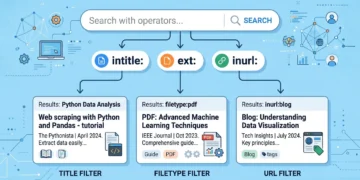


A search query like ext:asp intitle:cart looks cryptic, but it’s doing something simple: asking Google to return pages with “cart” in the title that run on the .asp file extension. Security researchers call these queries Google dorks, and they work because Google has already crawled and indexed far more of your site than you probably intended. If a forgotten shopping cart script, a backup file, or an admin login page is reachable without a password, a search engine likely found it years ago.
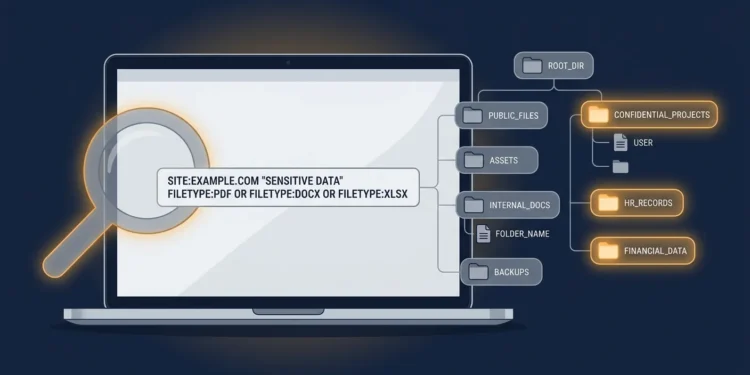
The useful part for site owners: the same queries work as a free audit of your own exposure. Pin site:yourdomain.com to the front of any dork and you’re no longer looking at the internet — you’re looking at your own indexed footprint, through roughly the same window an attacker would use. This guide covers what these searches actually reveal, how to run them safely against your own property, and what to do about whatever turns up.
What Google Dorking Is (and Isn’t)
Google dorking, sometimes called Google hacking, is the use of advanced search operators to surface information that’s publicly indexed but was never meant to be found. There’s no exploit involved. Everything a dork returns is a document Google already crawled from a server that served it without challenge.
That last point gets misunderstood constantly. The search itself breaks nothing. The exposure was created earlier, by a misconfigured directory, a file left in a web root, or a page nobody remembered to protect. Dorking just makes it findable in seconds rather than never.
Legally, running searches is running searches. What you do with results is a different matter — accessing someone else’s exposed system, even one Google handed you, can cross into unauthorized access under US law. Keep your queries pointed at domains you own or have written permission to test, and the ethical question disappears.
The Operators That Matter
Most dorks are built from a handful of operators, all documented and available to anyone:
| Operator | What it does | Why it matters for your site |
|---|---|---|
site: | Limits results to one domain | The anchor of every self-audit query |
ext: / filetype: | Matches a file extension | Finds indexed .bak, .sql, .log, .xls files |
intitle: | Matches text in the page title | Surfaces admin panels, carts, “index of” pages |
inurl: | Matches text in the URL | Catches paths like /admin, /backup, /test |
- | Excludes a term | Trims known-good results out of the noise |
Combine two or three and you get a precise filter. That’s all ext:asp intitle:cart is — an extension filter plus a title filter, aimed at a particular class of page.
What ext:asp intitle:cart Actually Reveals
This particular string is a known entry in the Google Hacking Database, the public catalog of queries that have historically surfaced sensitive pages. Understanding why it’s on that list tells you a lot about how legacy code becomes a liability.
Classic ASP shopping carts were everywhere in the early 2000s. Many were abandoned in place when businesses migrated to hosted platforms, and the old files simply stayed on the server. A page matching this query is often:
- Running on an unsupported stack. Classic ASP hasn’t received meaningful security attention in years, and the cart script itself may be from a vendor that no longer exists.
- Carrying parameters in the URL. Older cart pages pass product IDs, prices, and session values as query strings, which is where injection and parameter-tampering problems live.
- Undocumented internally. Nobody on the current team wrote it, so nobody is patching it.
- Still connected to something. A dead storefront page that still queries a live database is a far bigger problem than a static leftover.
The lesson generalizes well beyond ASP. Swap the extension and the title keyword and the same pattern applies to abandoned PHP forums, forgotten staging subdomains, and demo installs left in a subfolder. Search engines remember what your team forgot.
Running a Self-Audit on Your Own Site
Here’s the practical part. Every query below is scoped to your own domain, which is what makes this an audit rather than reconnaissance. Replace yourdomain.com with your actual site and work through them in a plain browser session.
Start with scope. Run site:yourdomain.com by itself and look at the result count. Most owners are surprised by the number. If you expect 400 pages and Google reports 9,000, something is generating pages you don’t know about — faceted URLs, old archives, a subdomain somebody spun up.
Then narrow by extension. Check which file types of yours are indexed:
site:yourdomain.com ext:asp
site:yourdomain.com ext:sql
site:yourdomain.com ext:bak
site:yourdomain.com ext:log
site:yourdomain.com ext:xls
Documents are fine when they’re meant to be public. A .sql dump or a .bak file is almost never meant to be.
Look for pages that shouldn’t be indexed at all:
site:yourdomain.com intitle:"index of"
site:yourdomain.com inurl:admin
site:yourdomain.com intitle:cart
site:yourdomain.com inurl:test
Directory listings (index of) mean your web server is displaying folder contents because no index file exists there. Admin and test paths showing up in search results mean they’re reachable without authentication, at least far enough for a crawler to read a title.
Check your subdomains too. site:*.yourdomain.com -www surfaces staging, dev, and legacy hosts that often run with weaker protection than the main site. Forgotten subdomains are one of the most common real-world findings in this kind of sweep.
A short note on expectations: Google’s index is a snapshot, not a mirror. A clean result doesn’t prove nothing is exposed, only that Google hasn’t indexed it. Running the same checks on Bing and DuckDuckGo takes five extra minutes and sometimes returns different results.
Fixing What You Find
Finding exposure is the easy half. The fix depends on what kind of problem it is, and the single most common mistake is confusing “hidden from search” with “secured.”
Step 1: Decide if It Should Exist at All
Before touching configuration, ask whether the asset has a reason to be on the server. An abandoned cart script, an old staging copy, a .bak file from a 2019 migration — none of these need de-indexing. They need deleting. Removing the file is the only fix that also closes direct access.
Step 2: Put Authentication in Front of Anything Sensitive
If the page must stay, protect it properly: server-side authentication, IP allowlisting for admin paths, or a VPN requirement for internal tools. This is the step that actually matters, because search engines are not the only thing scanning your server. Automated crawlers hit every public IP constantly, and they don’t consult your robots.txt.
Step 3: Understand the robots.txt Trap
This catches people out regularly. Disallowing a path in robots.txt asks well-behaved crawlers not to visit it — it doesn’t prevent access, and it doesn’t reliably remove a URL already in the index. Worse, robots.txt is a public file, so listing /admin-backup/ in it hands anyone curious a map of exactly where you keep the interesting things.
For keeping a page out of search results, Google’s own documentation on blocking indexing with noindex is the authoritative reference. The key detail: a noindex directive only works if the crawler is allowed to fetch the page and see it, so blocking the path in robots.txt actually prevents noindex from being applied.
Step 4: Remove Urgent Exposures from the Index
If something genuinely sensitive is live in search results, fix the server first, then request removal through Google Search Console’s removals tool for your verified property. Removal is a stopgap that hides the result while you remediate; it does nothing about direct access or about copies cached elsewhere.
Step 5: Make It a Recurring Check
A one-time sweep catches today’s problems. New ones arrive with every deployment, every plugin, every contractor who uploads a file to test something. Put a quarterly calendar reminder on a short list of your own site-scoped queries. The whole run takes fifteen minutes once you’ve saved the queries somewhere.
Where This Fits in a Real Security Program
Dorking your own domain is reconnaissance, not a penetration test. It tells you what’s visible from outside; it says nothing about what’s reachable behind a login, how your authentication holds up, or whether your database is configured safely.
OWASP’s Web Security Testing Guide treats search-engine reconnaissance as an early step in a much longer methodology, and that’s the right mental model. Use it as a cheap first pass that often finds something, then escalate to proper testing for anything that handles payments, personal data, or healthcare information.
For sites in regulated categories, this is where a qualified security professional earns their fee. If a self-audit turns up an indexed database dump or a customer file, you may also have breach notification obligations that vary by state — worth a conversation with counsel rather than a judgment call made alone. CISA’s resources for small and medium businesses are a reasonable starting point for organizations without a dedicated security team.
The Takeaway
A query like ext:asp intitle:cart isn’t a hacking tool so much as a flashlight pointed at the parts of your site you stopped looking at. Scope it to your own domain, spend fifteen minutes on a handful of site: queries, and you’ll usually find at least one thing worth deleting — an old file, a stale subdomain, a directory listing nobody noticed.
Do that today, fix what you find at the server level rather than just hiding it from search, and schedule the same check for three months out. It’s the rare security exercise that costs nothing and reliably returns something.
FAQ
Is Google dorking illegal?
Running search queries isn’t illegal; everything returned is already publicly indexed. Acting on what you find is where lines get crossed — accessing another organization’s exposed system without authorization can violate US computer access laws. Keep queries scoped to domains you own or are authorized to test.
Will blocking a page in robots.txt keep it out of search results?
Not reliably, and it doesn’t restrict access at all. A noindex directive is the correct tool for search removal, and it requires the crawler to be able to fetch the page. For anything sensitive, authentication is the real fix.
My site shows up for a dork query. Has it been hacked?
Not necessarily. Appearing in these results usually means something is publicly accessible that shouldn’t be, which is a misconfiguration rather than a compromise. Review the exposed asset, check server logs for unusual access, and bring in a professional if sensitive data was involved.
How often should I run these self-audit searches?
Quarterly works for most sites, plus an extra pass after major changes — a migration, a new plugin, a redesign, or any contractor work that touched the server.
Does this work on Bing and other search engines?
Mostly. Core operators like site:, filetype:, and inurl: work across major engines with minor syntax differences, and indexes differ enough that checking two engines is worth the extra minutes.