


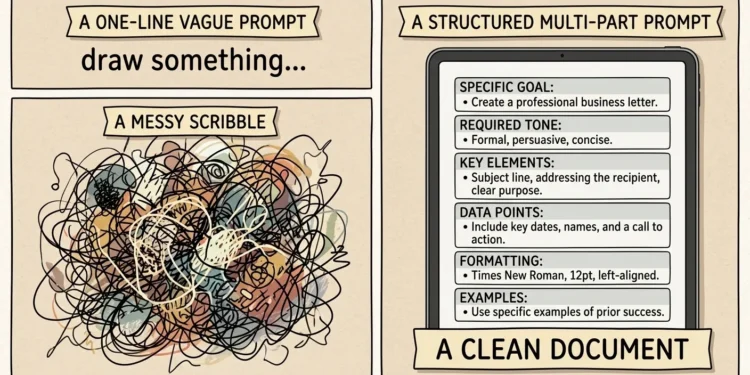
Ask ten people what practices are beneficial for training AI models with prompts and you’ll get ten lists of tips — but the honest answer starts with a correction. Prompts don’t train a model. Nothing you type into ChatGPT, Claude, or Gemini changes the model itself. What a good prompt does is steer a fixed model toward the output you actually want, and that steering is a learnable skill with a short list of practices that reliably work: be specific, provide context, show examples, structure the request, define the output format, and test your prompt on more than one input.
This guide covers each of those practices with concrete before-and-after examples, explains where the “training” confusion comes from, and flags the one piece of older advice that’s aging badly as models get smarter.
Does Prompting Actually “Train” the AI?
Worth settling first, because the confusion leads people to waste effort. Training a model means updating its internal parameters with large amounts of data — something done by AI labs on specialized hardware, or by developers through fine-tuning. A prompt does none of that. When you write a prompt, the model’s knowledge and abilities stay exactly as they were; you’re just giving it better instructions for this one task.
Two things keep the myth alive:
- Within a single conversation, the model does adapt to what you’ve said, because the whole chat history gets fed back in as context. It can feel like teaching. Close the chat and the “learning” is gone.
- Custom instructions, memory features, and project files persist your preferences across chats. That’s stored text being re-inserted automatically — still prompting, not training.
The distinction matters practically. If a model keeps failing at your task no matter how carefully you prompt, more clever wording won’t fix it; that’s when developers look at fine-tuning or retrieval setups (more on that near the end). For everything else — which is most everyday work — the practices below are the whole game.
The Core Practices for Writing Prompts That Work
These hold up across ChatGPT, Claude, Gemini, and most other current models. The techniques apply broadly even though each model has its own quirks in what it responds to best.
1. Write the Prompt Like a Work Brief
The single highest-impact habit. Vague requests produce generic output because the model fills every unspecified gap with the most average possible choice. A useful prompt reads like a brief you’d hand a competent freelancer: what, for whom, how long, in what tone, with what constraints.
Compare:
Weak: “Write a product description for my candle.”
Better: “Write a 90–120 word product description for a soy candle called Cedar Hollow (cedarwood, amber, sea salt notes, 45-hour burn time). Audience: people buying home gifts in the $25–40 range. Tone: warm but not gushing. End with one line about the cotton wick and US small-batch production. No exclamation marks.”
Nothing about the second prompt is clever. It’s just complete. Most “bad AI output” is really an incomplete spec.
2. Give Context Before the Task
Models can’t read your situation. Two sentences of background change everything downstream: who you are, what the output is for, and what’s already been tried or decided.
“Rewrite this email” gets a generic polish. “Rewrite this email — I’m a freelancer nudging a client about an invoice that’s 3 weeks overdue, second reminder, I want to stay friendly but firm because I want repeat work from them” gets something you can actually send. A role assignment (“You’re an experienced hiring manager reviewing this resume”) works the same way: it’s compressed context, telling the model which knowledge and standards to apply.
3. Show, Don’t Just Tell (Few-Shot Examples)
When format, style, or judgment matters, one or two examples outperform paragraphs of description. This is called few-shot prompting, and it’s especially reliable for repetitive structured work: classification, rewriting in a house style, data extraction, naming conventions.
A practical pattern for, say, support-ticket tagging:
Classify each ticket as Billing, Bug, or Feature Request.

Ticket: "I was charged twice this month" → Billing
Ticket: "The export button does nothing on Safari" → Bug

Ticket: "Any chance you'll add dark mode?" →
Good examples teach three things at once — structure, range, and the quality bar — so pick examples that differ from each other rather than three near-identical ones. The trade-off is length: examples eat space, so use them where consistency pays and skip them for simple one-off asks. One current-model caveat: on newer reasoning-focused models, OpenAI’s own guidance suggests trying zero-shot first and adding examples only if they measurably help, because those models often infer the pattern without them.
4. Structure Long Prompts With Clear Sections
Once a prompt contains instructions plus material to work on (an article to summarize, data to analyze, an email thread to answer), separate the parts explicitly. Mixing them invites the model to treat your instructions as content or vice versa.
Simple delimiters work: triple quotes, markdown headers, or labeled sections like INSTRUCTIONS / CONTEXT / TEXT / OUTPUT FORMAT. Claude responds particularly well to XML-style tags such as <instructions> and <example>, while Google’s prompt-design guidance recommends placing your specific question after the data context, at the end of the prompt. The common thread across vendors: the model should never have to guess where your instructions stop and your material begins.
5. Specify the Output Format Explicitly
If you don’t define the shape of the answer, you’ll get the model’s default — usually longer and more decorated than you want. Say exactly what you need:
- “Return a markdown table with columns X, Y, Z”
- “Give me 5 bullet points, max 12 words each”
- “Respond with valid JSON only, no commentary”
- “Write it as one paragraph I can paste into Slack”
This is also the cheapest fix for the most common complaint about AI output (“it’s too wordy”). Length limits, banned phrases, and “no preamble, start directly with the answer” all belong in the prompt, not in your post-editing routine.
6. Break Big Jobs Into Steps
Asking for a finished 2,000-word report in one shot bundles research, structure, drafting, and polish into a single roll of the dice. Splitting it — outline first, then sections, then a revision pass — gives you checkpoints to correct course before errors compound. Practitioners call the formal version prompt chaining: the output of one prompt becomes the input of the next.
In a chat interface this is just working iteratively: “First list the 6 sections this guide needs. [review] Now draft section 2 only.” You catch a bad outline in ten seconds instead of discovering it buried in a finished draft.
7. Phrase Instructions Positively
“Don’t be formal” leaves the model guessing among a hundred informal flavors. “Write like a friendly colleague on Slack — contractions fine, no corporate phrases” points at a target. Negative-only instructions also fail more often outright; models follow “do X” more reliably than “avoid Y.” Keep your don’ts (they help), but pair each with a do.
8. Give the Model Permission to Say “I Don’t Know”
Models are tuned to be helpful, and unconstrained helpfulness produces confident guesses. For anything factual, add an escape hatch: “If you’re not sure, say so rather than guessing” or “Only use information from the text I’ve provided; if the answer isn’t there, say it isn’t.” This one line meaningfully cuts fabricated details in summaries, research tasks, and data extraction — and it costs you nothing.
9. Iterate — Then Test on More Than One Input
First drafts of prompts are like first drafts of anything. The practical loop: run it, diagnose the gap between what you got and what you wanted, fix the specific gap (usually a missing constraint or missing context), and run again. Industry write-ups consistently note that iterative refinement is where most quality gains come from, with a large share of real-world AI conversations involving exactly this kind of refinement.
If a prompt will be reused — a weekly report generator, a product-description template — one extra habit separates amateurs from pros: run it against 5–10 different representative inputs before trusting it. A prompt that works beautifully on your test case and collapses on the third real one wasn’t done yet.
10. Save What Works
Once a prompt performs, store it. A simple doc with the prompt, what it’s for, and a version note (V1, V2, what changed) turns one-off wins into a reusable library. Teams increasingly treat prompts as versioned working assets precisely because quality becomes measurable only when you can compare versions. For individuals, even a Notes file beats re-improvising the same request every week.
A Full Before-and-After, Start to Finish
Here’s how the practices stack in one realistic example — a small-business owner wanting social posts.
Before:
“Write some Instagram posts about my bakery.”
Output: five interchangeable posts with rocket emojis that could be about any bakery on earth.
After:
“You’re a social media writer for small food businesses. Write 3 Instagram captions for Harvest & Crumb, a neighborhood bakery in Austin known for sourdough and cardamom buns. Audience: locals 25–45 who care about from-scratch baking.
Format: each caption 2–3 short sentences + one question to drive comments + 3 hashtags (no generic ones like #food).
Tone: warm, a little playful, zero salesy phrases like ‘treat yourself.’
Example of our voice: ‘The cardamom buns sold out by 10am again. We’re not saying set an alarm, but… set an alarm.’
One caption should mention we’re launching Saturday pretzel mornings this month.”
Same model, same effort to run — maybe ninety extra seconds to write — and the output needs light edits instead of a rewrite. Every improvement maps to a numbered practice above: role and context (2), audience and specifics (1), format spec (5), positive tone direction (7), a voice example (3), and a concrete content requirement (1 again).
The Advice That’s Aging: Over-Prompting Reasoning Models
One widely repeated tip deserves an update. For years, “think step by step” and long chain-of-thought scaffolding were standard advice. On newer reasoning models — the ones that deliberate internally before answering — that scaffolding is increasingly redundant, and several practitioner guides now describe elaborate walk-the-model-through-it prompts as dead weight on these systems; vendor guidance leans toward simpler, direct prompts first.
The practical rule: start simple, add structure only when the output shows it’s needed, and don’t cargo-cult reasoning instructions into every prompt. Model behavior shifts fast enough that what’s true this year may shift again — test against the model you actually use rather than trusting any guide, including this one, as permanent.
When Prompting Isn’t Enough
Since the search phrase mentions “training,” here’s where real training enters the picture. If you’ve applied everything above and the model still consistently fails — wrong domain vocabulary, can’t match a strict legal format, doesn’t know your internal data — you’ve hit prompting’s ceiling. The developer-side options:
| Approach | What it is | When it fits |
|---|---|---|
| Prompt engineering | Better instructions, zero model changes | Almost all everyday and business use |
| RAG (retrieval) | Automatically feeding relevant documents into the prompt | Model needs your private or current data |
| Fine-tuning | Actually training the model on example pairs | Strict style/format at scale, specialized domains |
Fine-tuning is real training — it updates model weights, requires hundreds-to-thousands of examples, costs money, and is overkill for most needs. The honest hierarchy: exhaust prompting first (it’s free and instant), add retrieval if the problem is missing knowledge, and fine-tune only when the problem is behavior that prompts can’t pin down.
Mistakes That Quietly Ruin Good Prompts
Even with the practices down, a few habits keep tripping people up:
- Stacking unrelated tasks in one prompt. “Summarize this, then write a tweet, also what do you think of the title” degrades all three. One job per prompt, or clearly numbered sub-tasks.
- Burying the actual question in the middle of a wall of context. Lead with the task or end with it — don’t hide it.
- Assuming the model remembers earlier chats. Unless a memory feature is on, each conversation starts blank. Re-supply crucial context.
- Accepting confident wrong answers. Fluency isn’t accuracy. Verify names, numbers, dates, and citations before they go anywhere public.
- Editing output forever instead of fixing the prompt. If you make the same manual fix three times, that fix is a missing instruction.
The Takeaway
So, what practices are beneficial for “training” AI models with prompts? Strictly speaking, none — prompts steer, they don’t train. But the steering practices are few and learnable: brief the model like a freelancer, give it context and examples, structure the request, define the output, allow it to admit uncertainty, and test anything you’ll reuse against multiple inputs. Pick your most-repeated AI task this week, rewrite that one prompt using the before/after pattern above, and save the version that works. One good saved prompt beats fifty improvised ones.
FAQ
Can I train ChatGPT or Claude by correcting it in chat?
Only within that conversation. Corrections shape the rest of the current chat because the history is re-read each turn, but the underlying model never changes, and a new chat starts from zero unless a memory feature carries notes forward.
What’s the difference between prompt engineering and fine-tuning?
Prompt engineering improves instructions to a fixed model — free, instant, no technical setup. Fine-tuning retrains the model on your examples — a developer task with real costs, used when prompts alone can’t produce the required behavior.
How long should a prompt be?
As long as the task needs and no longer. A simple question needs one line; a reusable business prompt might run 150–300 words of role, context, constraints, examples, and format. Length isn’t the goal — completeness is.
Do the same prompting techniques work on every AI model?
The fundamentals (specificity, context, examples, format specs) transfer across models, but details differ — structuring preferences, how much reasoning guidance helps, and ideal example counts vary by model and change between versions, so test on the model you use.
Why does the same prompt give different answers each time?
Models generate responses probabilistically, so some variation is normal. Tighter instructions, examples, and explicit format requirements shrink the variation; in developer settings, lowering the temperature setting reduces it further.